ITEMIQ / LIVE SELLING SOFTWARE
Live selling software that keeps the host and crew on the same item.
During a Whatnot, eBay Live or TikTok show, the host is on camera and can’t search a catalog. A teammate off camera can. ItemIQ splits the job between two screens: Host View, the host’s display with the current item, comps and notes, and Remote Host, the crew’s browser page for sending the next SKU, notes and announcements to that display.
Two screens, two jobs
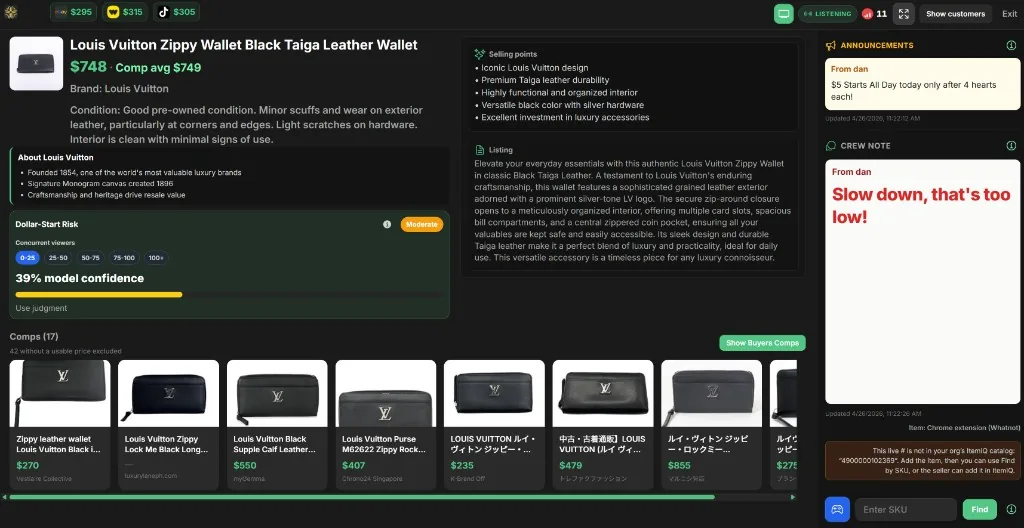
Host View — the host’s display
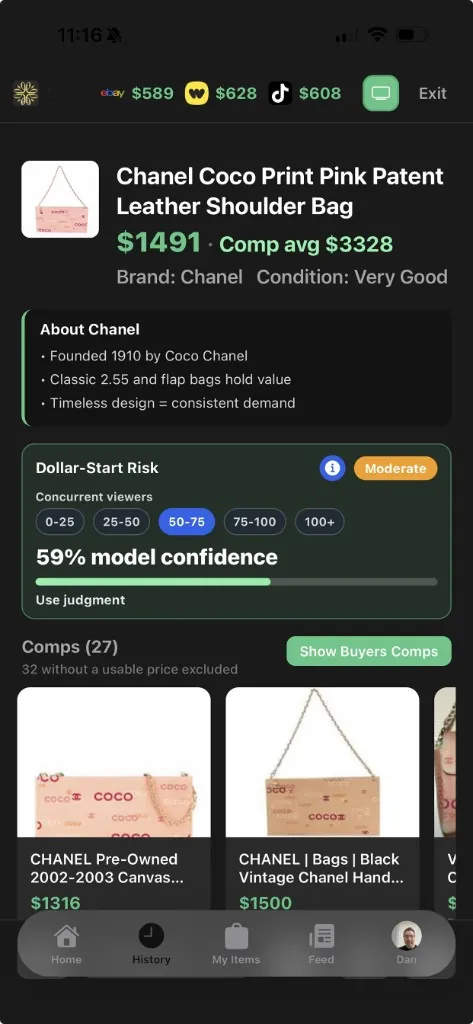
- The current item: photo, title, price, comp average, brand, condition, selling points and listing description
- Comps for the item, with a Show Buyers Comps button
- Dollar-Start Risk: a model estimate, for the viewer count you choose, based on brand, cost and the lowest comp
- A minimum sale price per marketplace, calculated from the item’s cost
- The latest crew note and room announcement from Remote Host
- A Find SKU box, so the host can load an item without a crew
- With live sync on: viewer counts, chat and sold lots from the show
Runs full-screen in a browser on a second monitor or TV, or in the iPhone app.
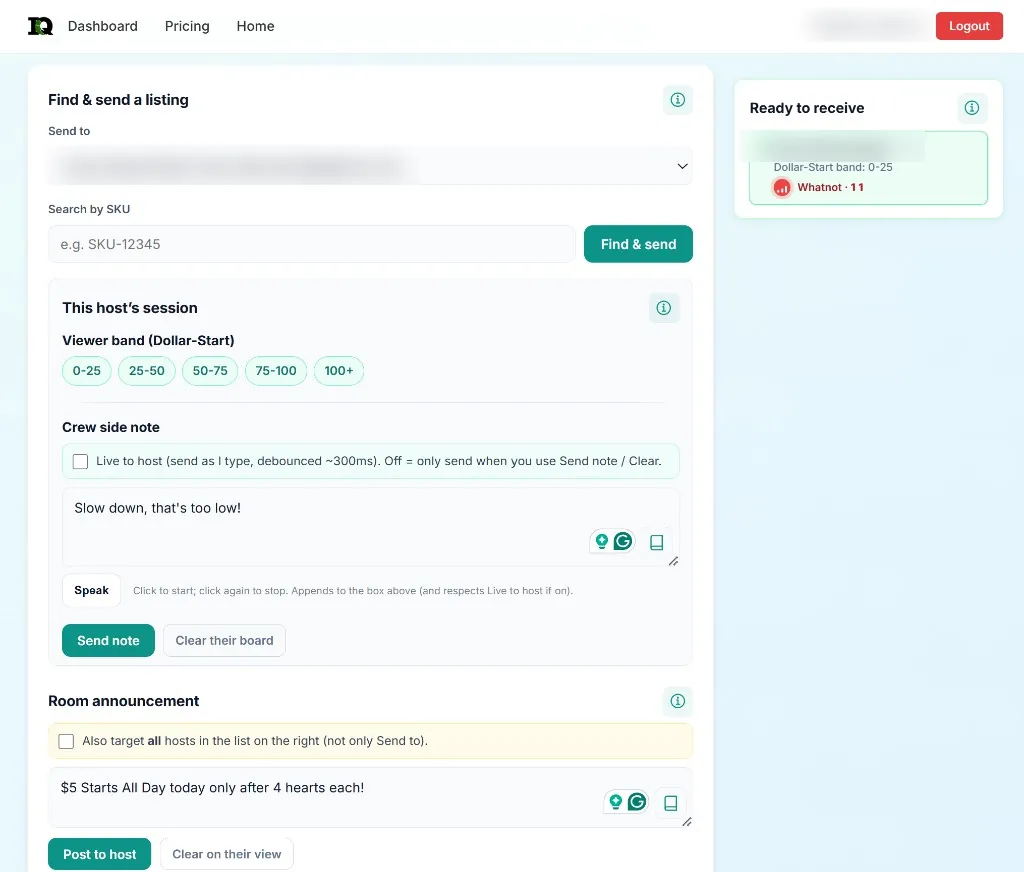
Remote Host — the crew’s controls
- Ready to receive: the hosts currently listening, with their platform and viewer band
- Find & send: search by SKU and push the item to the chosen host
- Viewer band setting used by Dollar-Start Risk
- Crew side note: send on demand, or live as you type; speech input appends to the note
- Room announcement: post to one host, or to every listening host
- Clear the host’s note or announcement when it no longer applies
A web page, so any teammate signed in to the same organization can run it from a laptop.
Before the show
- Get the lineup into ItemIQ. Each item needs a SKU and a reviewed record. The title, description and selling points are what Host View shows, so correct the AI draft first.
- Prepare the marketplace side. If the platform takes a file, export it — Whatnot CSV, eBay File Exchange or TikTok Shop’s Women’s Handbags XLSX — and upload it on that platform. ItemIQ doesn’t create the show for you.
- Open Host View on the show computer. Sign in, go full-screen, and optionally start live sync: paste the show’s URL (Whatnot, eBay Live, or the TikTok seller console). The data comes through the ItemIQ Chrome extension on that computer or another one, or through a cloud browser if the extension isn’t available.
- Open Remote Host on the crew laptop. Check the host appears under Ready to receive and set the viewer band.
- Rehearse one handoff. Send one SKU, confirm the host sees the intended item, and send a test note. The pre-show checklist covers the physical side, and the live show preparation walkthrough follows a full show end to end.
During the show
- The crew sends the next item. The host’s display switches to it, with comps and selling points ready to talk through.
- Notes go to the host, not the chat. “Slow down, that’s too low!” appears on Host View and nowhere else. Announcements, such as a giveaway rule, stay on screen until cleared.
- Risk and minimum price give the host a check before a dollar start. They are estimates; the Dollar-Start panel itself says to use judgment.
- Solo hosts use Find SKU on Host View directly. With auto-load on, catalog items load when the synced live SKU matches.
After the show, match sold lots to the marketplace’s orders before marking items sold or restocking. Order data comes from the platform, not from the synced view.
What ItemIQ does with each marketplace
Show preparation, export files, account connections and direct publishing are different things. This is what each platform supports today:
| Platform | Export file | Live sync to Host View | Account connection | Direct listing publish |
|---|---|---|---|---|
| Whatnot | Whatnot CSV | Yes, from the show URL | No | No — upload the CSV in Whatnot |
| eBay | eBay File Exchange CSV | Yes, eBay Live show URL | Yes, from the iPhone app | Yes, from the iPhone app after connecting |
| TikTok Shop | Women’s Handbags XLSX (TikTok template) | Yes, seller console URL | Yes, reads orders and listings | No — upload the template in TikTok Shop |
| Shopify | Shopify product CSV | Not a live platform | Yes, on the web | Yes, create or migrate products |
Questions before your first show
Do I need a crew to use it?
No. A solo host can use Host View with its Find SKU box. Remote Host helps when a teammate can run the catalog while you stay on camera.
Does ItemIQ list my items on Whatnot?
No. Export a Whatnot CSV from ItemIQ and upload it in Whatnot. During the show, Host View can sync live data from the show’s URL.
Can several hosts run at once?
Yes. Each host listening in the organization shows up under Ready to receive. The crew picks who to send to, and an announcement can go to every listening host.
Where do the comps and Dollar-Start Risk come from?
Comps come from a visual search for similar products, with outliers filtered from the average. Dollar-Start Risk is a model estimate from brand, the item’s cost, the lowest comp and the viewer band you choose. Both are context for the host, not price guarantees.
Is this included in the Free plan?
A Free account gets item records, AI drafts and image credits. Host View and Remote Host need an organization, which self-serve customers get through Pro. Current plans.