ITEMIQ / AI LISTING PREPARATION
Turn item photos into a listing draft you review before it sells.
ItemIQ is for resellers who photograph one item at a time — bags, watches, jewelry, accessories — and then retype the same title, description and attributes for every channel. Ask IIQ in the ItemIQ iPhone app reads your photos and writes a first draft. You check it against the item, fix what is wrong, and use the corrected record for a live show, an export file or a connected store.
What the AI draft fills in
Ask IIQ looks across all the photos of an item, including labels, hardware, date codes and interior shots when you include them. It returns a structured draft rather than one block of text:
Listing copy
- A listing title (kept under 60 characters)
- A listing description (about 150–200 words)
- Key features and selling points
Item attributes
- Brand, product type, style or model
- Materials, colors and hardware color
- Condition, plus size only when the model is confident
- Category and a suggested price range
Every field is a suggestion. The draft is saved to the item record so you can correct it there; nothing in it has been checked by a person until you check it.
From photo to sale-ready record
- Create the item and photograph it. In the iPhone app, turn on 8 Pics and tap Quick SKU to take up to eight photos of one item, then give it its SKU. Background removal is optional and uses 1 credit per image.
- Generate the draft. Open the item and tap Get Analysis, then Ask IIQ, then Save. The draft appears in the item’s AI Analysis section with the title, description, attributes and suggested price.
- Review and correct it. Edit any field on the item page in the app, or on the web catalog item page at a desk. Corrections are saved back to the same record.
- Check the price separately. Comps Check (Find Similar Products) in the app runs a visual search for similar products and shows the low, average and high prices of priced matches. Use it as context alongside your cost and the item’s condition.
- Prepare it for where it will sell. Load it in Host View for a live show, add it to an export file for a marketplace upload, or publish it through a connected Shopify or eBay account.
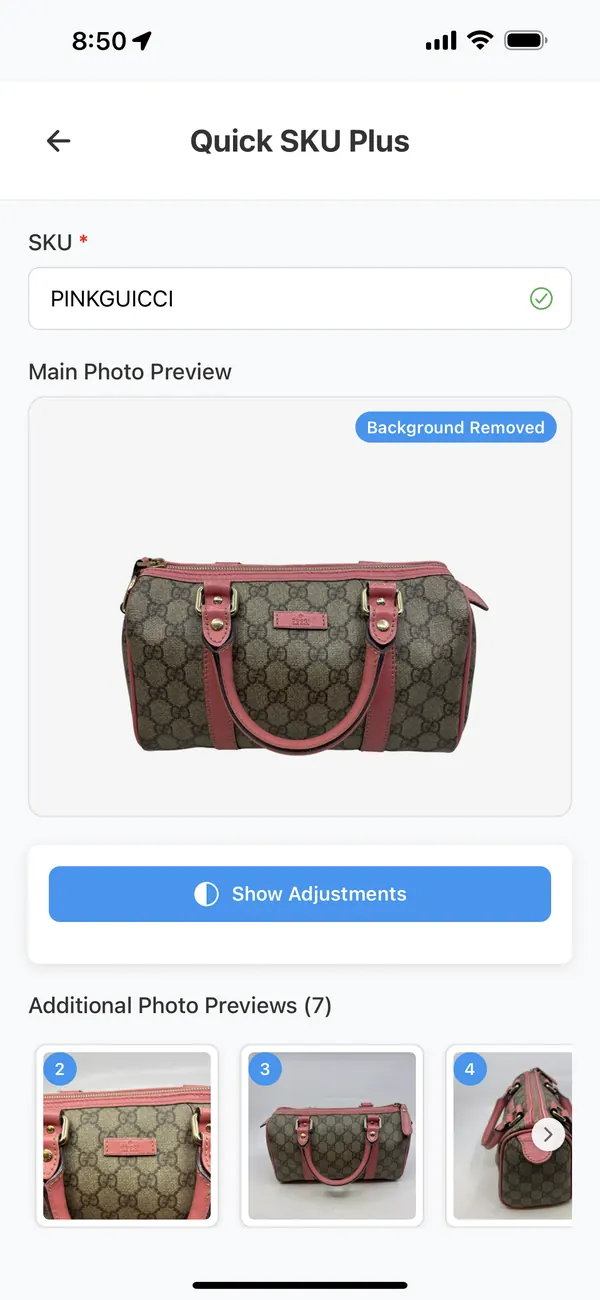
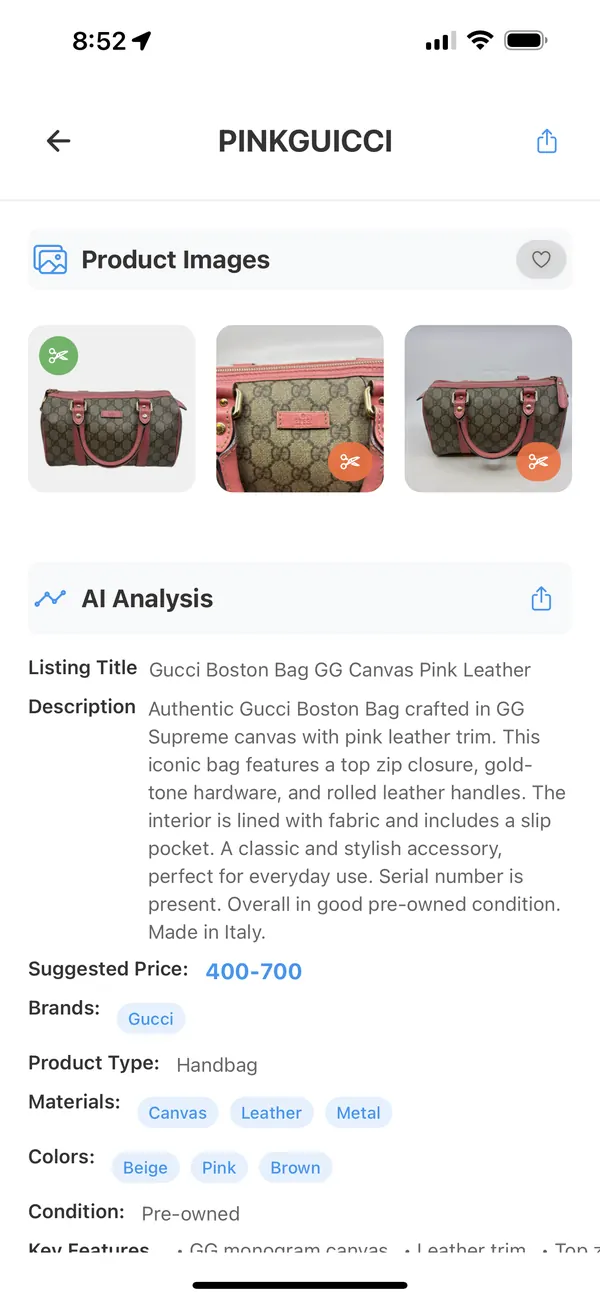
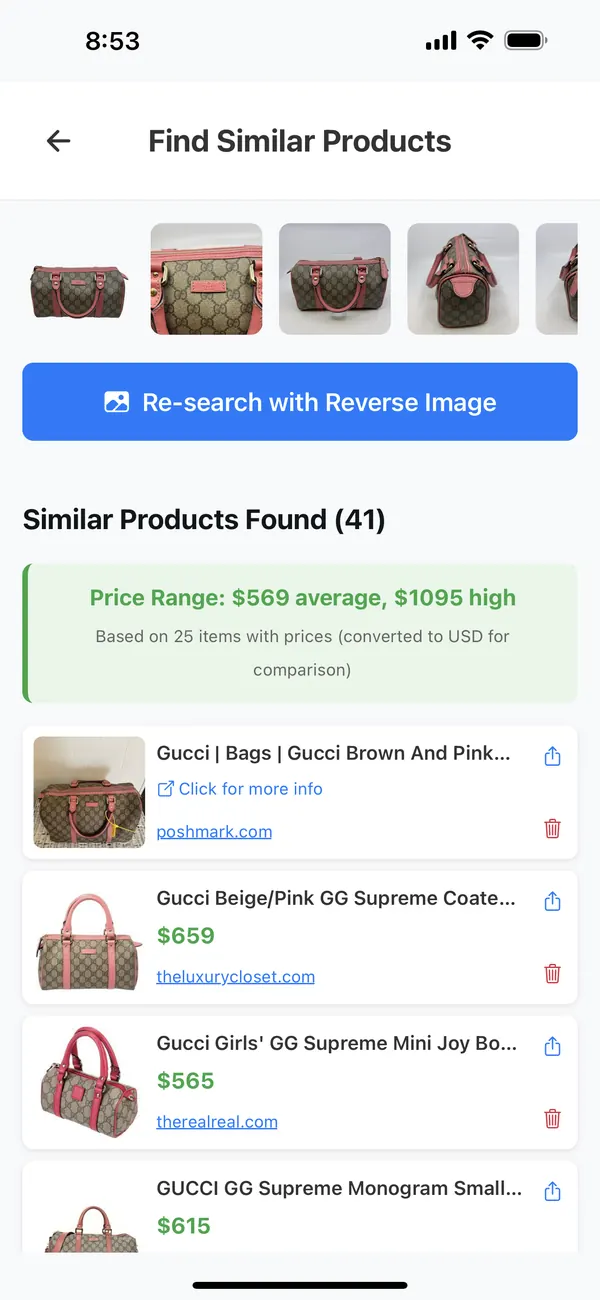
Example: an AI draft and the seller’s corrections
The left column is the actual draft shown in the screenshot above, for a Gucci Boston bag from the ItemIQ team’s own inventory. The right column shows the kind of corrections a seller makes after inspecting the bag. The corrections are illustrative — they show the review process, not this bag’s verified condition.
| Field | AI draft | Seller correction (illustrative) |
|---|---|---|
| Title | Gucci Boston Bag GG Canvas Pink Leather | Kept, with the size added once measured |
| Authenticity | “Authentic Gucci Boston Bag…” | “Authentic” removed. Added back only after an authentication service or the seller’s own documented check. |
| Serial number | “Serial number is present.” | Confirmed against the interior tag photo, or the sentence removed |
| Condition | “Overall in good pre-owned condition.” | Specific notes from inspection, e.g. corner wear and the state of the interior lining |
| Origin | “Made in Italy.” | Kept only if the heat stamp is legible in a listing photo |
| Price | Suggested 400–700 | Set by the seller after comps, cost and condition |
Where the corrected record goes next
Live shows
Host View shows the item’s title, description, selling points and comps to the host when the SKU comes up. How live selling works in ItemIQ.
Export files
Whatnot CSV, eBay File Exchange CSV, Shopify product CSV, TikTok Shop Women’s Handbags XLSX (from TikTok’s template), the IIQ CSV, Custom Export mapped to your own template, and IIQ Bulk Zip with photo folders. You upload the file to the marketplace yourself.
Connected stores
Shopify can be connected and products created or migrated from the web. eBay is connected from the iPhone app, where items can be published as eBay listings. Publishing is something you set up; review the listing in the marketplace afterwards.
Not supported
There is no direct listing publish to Whatnot or TikTok Shop. Use their export files. A TikTok Shop connection reads orders and listings only.
Questions before you start
Can I generate AI drafts on the website?
Not today. Ask IIQ runs in the ItemIQ iPhone app. On the web you can view and edit the draft fields (title, description, suggested price, brand, type, size, materials, colors, condition, categories, key features and selling points) on the catalog item page.
Do AI drafts use credits?
No. Ask IIQ drafts and Comps Check don’t use credits, though daily usage limits apply. Credits are spent on image work: background removal uses 1 credit, AI Enhance uses 2. The Free plan includes 20 credits a month, which don’t roll over.
Is the draft accurate enough to post as-is?
Treat it as a first draft. It is often a useful starting point for title and attributes, but it can be wrong about authenticity, condition, model and size, as the example above shows. Review every field before the item is offered for sale.
Which items does it work best for?
The prompt is built around branded resale goods and classifies items into bags, watches, jewelry and accessories. Clear photos of labels, hardware and serial or date-code areas give the model more to read.
Will it post my listing to a marketplace automatically?
Generating a draft doesn’t post anything. Getting an item onto a marketplace is a separate step: upload an export file, or publish through a Shopify or eBay connection you have set up.